
HelioBase Installer
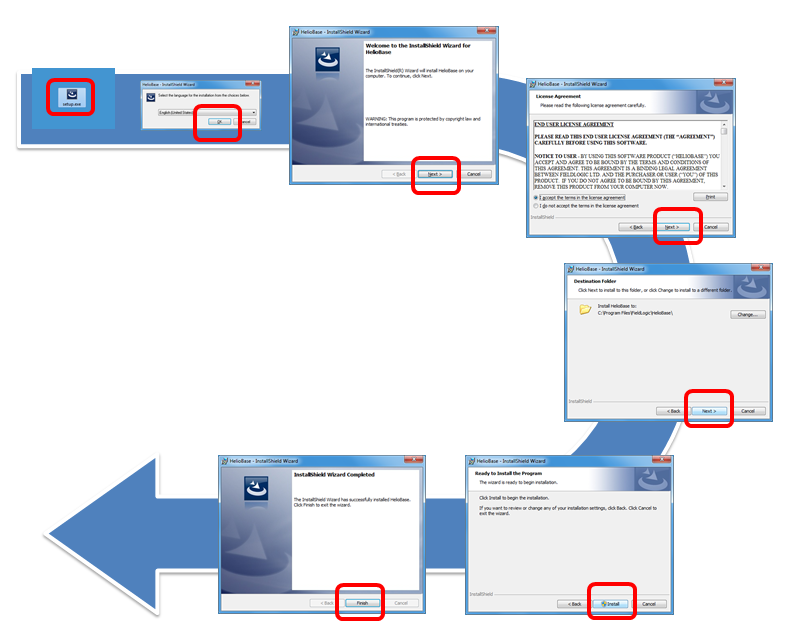
- Download a setup module from link above.
- Execute it to setup the application.
- Register your trial license.
- Execute HelioBase from Windows start menu.
- Click 'OK' button on a 'license alert' dialog.
- Click 'Acquire Trial License' button on a 'License Settings' dialog.
- Input your name and email address.
- Your license password will be sent to you by email.
- Input your password in the 'License password' text box on the 'License Settings' dialog.
You can open it anytime by executing the HelioBase application from Windows start menu.
note: HelioBase needs HTTP(S) communication with port 80 and 443.
Documents
- Brochure [English] [Japanese]
- Tutorial Basic(Ver2.0.5.8) [English] [Japanese]
- Tutorial 3D Model Generation/Placement(Ver2.0.5.8) [English] [Japanese]
- Tutorial PV Placement(Ver2.0.5.8) [English] [Japanese]
- Tutorial Power Generation Calculation(Ver2.0.5.8) [English] [Japanese]
- Tutorial Layout mode(Ver2.0.5.8) [English] [Japanese]
Sample data
- Sample Data for the tutorial(Basic) [DATA]
- Sample Data for the tutorial(PV Placement) [DATA]
- Sample Data for the tutorial(3D Model Generation/Placement) [DATA]
- Sample Data for the tutorial(3D Model Generation/Placement) [DATA]
- Sample Data for the tutorial(Power Generation Calculation) [DATA]
Plugin script
- Convert Sketchup SKP files to DXF or STL[download page]